


Voxer Walkie Talkie Messenger
3.351.44K Reviews
App Specs
- Version
- 5.3.2.23200
- Updated On
- License
- Free
- Downloads
- 10,000,000+
- Developer
- VoxerPro LLC
- Categories
- Communication
- Platform
- Android
Screenshots

 Analysis by AppCompare
I judge a communication app not just by how quickly it gets a message across, but by whether its controls and everyday trade-offs feel clear enough for me to use it comfortably. Voxer is built around voice messages that can be heard as they arrive or played later, which makes it a different proposition from a standard call or a text-first messenger. I’d consider it for a group that needs quick, practical updates, while taking care to think through what I share and who is in the conversation.
What the walkie-talkie format changes
The key difference is the push-to-talk rhythm: I can say something without arranging a call, and the other person does not have to answer on the spot. That can be useful when a team is moving between tasks, or when friends are trying to find one another in a noisy place. It also changes the feel of a chat. Spoken updates carry tone and context that can be awkward to type, but they are less discreet than a short text and may take longer to review.
For a group coordinating a weekend outing, I’d use voice for immediate details such as “I’m by the north entrance” and text for information people may need to scan later. Photos and location sharing can add context, but they also make it worth pausing before sending: check the intended conversation and consider whether everyone in it needs that detail. This simple division—voice for quick coordination, text for reference—helps prevent a lively thread from becoming hard to search through mentally.
Where it fits among messaging options
Compared with a phone call, Voxer gives the recipient more freedom to listen later, but it cannot provide the same back-and-forth immediacy when a decision needs to be made right now. Compared with ordinary text messaging, it can be quicker to speak a detailed update, though a written message is easier to skim in a quiet space or keep as a precise instruction. I see the app as a useful extra communication lane, not a replacement for every call or chat.
It makes the most sense when several people share a reason to exchange short updates and are comfortable with voice notes. If your conversations are mostly private one-to-one messages, or you need every detail to be readable at a glance, a text-first messenger may suit you better. Likewise, if the group does not want another app to check, the convenience of push-to-talk may not outweigh the effort of getting everyone set up.
Useful habits for groups and teams
A small amount of coordination can make a group conversation easier to follow. I’d agree on what the channel is for, keep messages focused, and put durable details—such as an address or a change of plan—in text rather than relying on someone to remember an audio message. For work, that distinction matters: a quick spoken status can help people stay in sync, while decisions and instructions deserve a clear written record that the team can refer back to.
Voice also has a practical privacy trade-off: a recipient can listen later, but that does not mean every setting is appropriate for playback. In a quiet office, on public transport, or around other people, headphones or a text message may be the more considerate choice. I would avoid sending sensitive details aloud when I could not control who might hear them nearby, and I would check a recipient before sharing a location that reveals where someone is.
Worth Reading Before You Choose

EA SPORTS FC Mobile 26 Is a Bigger Football Game, but It Takes Time

Flipboard Shows What News Apps Must Do Beyond the Feed

Switching to Android Auto Means Rethinking Your Driving Routine

Google Calendar Makes a Crowded Week Easier to Manage

Ludo King Makes the Most of the Minutes Between Plans

Baby Panda World Brings Quick Play to Modern Phones, but Its Game Library Feels Busy
Trying Voxer in everyday use
Ever wished you could turn your phone into a walkie talkie and chat with friends in real-time without the hassle of making a call? Well, that’s where Voxer Walkie Talkie Messenger swoops in like a superhero. This nifty app merges the old-school charm of walkie talkies with modern messaging features, making communication a breeze.
Getting Started with Voxer
First things first, getting Voxer Walkie Talkie Messenger set up on your device is as easy as pie. Whether you're on Android or iOS, just head over to the app store, hit download, and pop it open once it's ready. The registration process is straightforward. You just need to enter your email or phone number, and you’re all set to start chatting away.
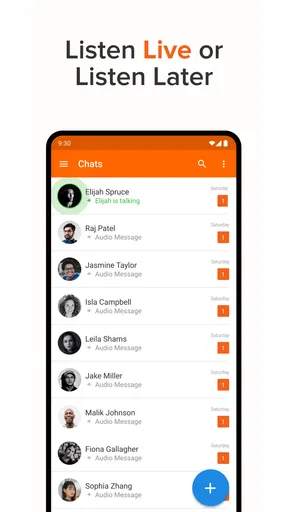
Once inside, you’ll notice a clean and intuitive interface. The app isn’t cluttered with unnecessary features, which is a breath of fresh air. You can easily find your contacts and start a conversation in no time.
The Walkie Talkie Experience
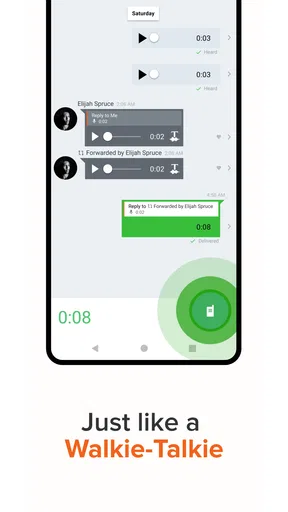
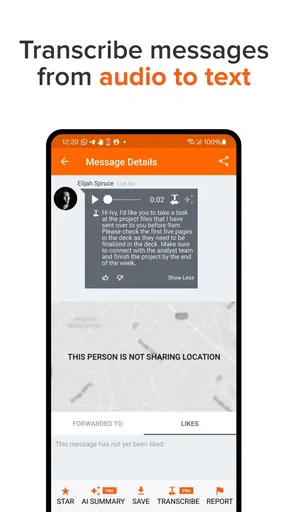
Here’s where the magic happens. The walkie talkie feature is hands-down the star of the show. Just hold down the button, speak your message, and release it to send. It’s like having a real-time conversation without the pressure of a live call. And if your friend isn’t available to listen right away, no worries! They can play back your message whenever they have a moment. This asynchronous communication is a game-changer.
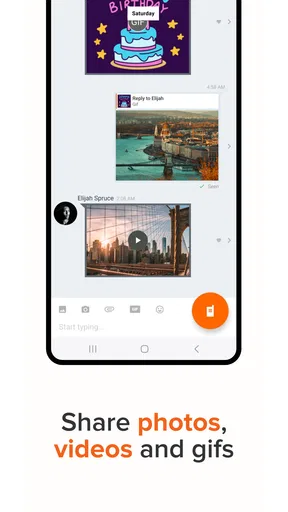
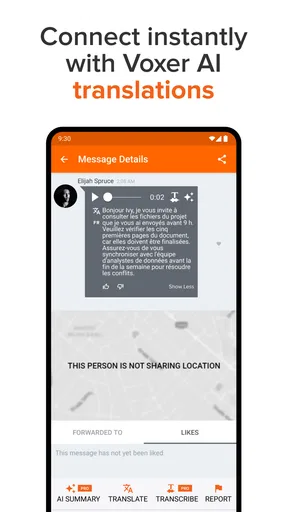
What’s even cooler is that you can send texts, photos, and even locations. So, it’s not just about voice messages. This makes it versatile, whether you’re coordinating with friends at a concert or sharing your latest travel adventure.
Sound Quality and Performance
Let’s talk about sound quality. It’s pretty impressive! The audio clarity is top-notch, and there’s hardly any lag. It feels like your friend is right next to you, whispering in your ear. Plus, the app performs smoothly without any noticeable glitches or crashes, which is a big thumbs up for reliability.
Privacy and Security
In today’s digital age, privacy is a big deal. Voxer understands that and offers end-to-end encryption for your messages. This means your conversations are safe from prying eyes. You can chat freely, knowing your privacy is being respected.
Team Communication Made Easy
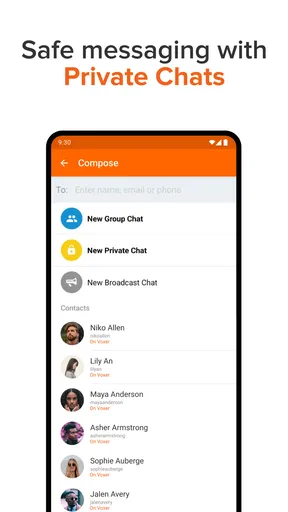
If you’re using Voxer for work, you’re in luck. The app has some neat features for team communication. You can create group chats, share files, and keep everyone in the loop with ease. It’s like having a walkie talkie network for your team, making it perfect for remote work scenarios.
Customization and Fun Features
Voxer isn’t just practical; it’s fun too. You can customize your experience with different themes and notification sounds. Plus, there’s a neat feature where you can speed up or slow down audio messages. So, if your friend is a fast talker, you can slow things down and catch every word. It's the little things that make this app stand out.
Controls, versions, and a cautious verdict
Voxer Messenger is a free communication app from VoxerPro LLC, with optional in-app purchases ranging from about three dollars to fifty dollars per item. Its Everyone age rating makes it broadly accessible, though I’d still treat group membership and shared content thoughtfully. It has an average rating of 3.3 from around 225,000 ratings, alongside roughly 53,000 written reviews and over 10 million installs. That level of use suggests it has found an audience, but the rating is a reminder that the walkie-talkie approach will not click for everyone.
The current version is 5.0.15.23184 and it requires Android 6.0 or later. If you’re choosing it for a group, I’d check that everyone’s phone can run it before asking them to switch over; an app is only useful if the people who need to hear updates can actually join. It is free to begin, but I would look at any optional purchase details in the app before paying, rather than assuming a paid option is necessary for the basic use I want.
One practical question is whether a recipient must be available at the same time. The replayable voice-message format is useful precisely because a person can listen later, so I would not treat it as a guaranteed live connection for urgent instructions. If timing matters, I’d use a call or another agreed way to get an immediate response, then use Voxer for follow-up context. For the same reason, I would establish a simple convention with a team: mark urgent requests clearly in words and do not assume that a sent voice message has already been heard.
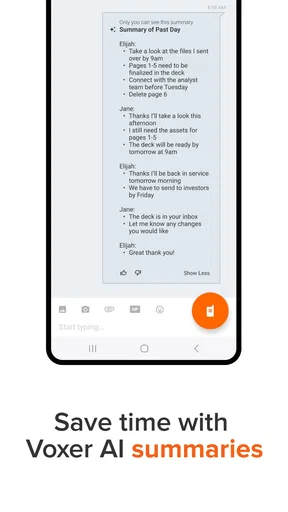
Another question is whether it makes sense for a whole workplace. It can help a small team that benefits from spoken check-ins, but it is not automatically a substitute for a formal record of decisions. A short audio update can keep people moving, while a written summary is safer for instructions that must be read accurately later. I’d also ask whether everyone is comfortable receiving voice notifications during work or personal time; agreeing on when to use the group can prevent a useful channel from turning into background noise.
Trust is part of that decision, especially because messages can include voice, photos, and location. I would not infer privacy guarantees from the app’s walkie-talkie style or from a general impression of its interface. Before sharing anything sensitive, I’d review the choices and notices shown in the app and make sure I understand who can see or hear what I send. I’d also keep location sharing purposeful: a meetup point can be handy, but a location is personal context, not just another casual message.
The app is best for people who enjoy speaking short updates, want recipients to listen on their own schedule, and have a group willing to use the same channel. It is less compelling for anyone who prefers quiet, searchable text, needs a formal archive, or wants a conversation to demand an immediate response. I’d try it with one small, low-stakes group first, agree on what belongs there, and see whether voice actually makes coordination easier before moving important conversations into it.
Wrapping It Up
All in all, Voxer Walkie Talkie Messenger is a delightful blend of nostalgia and modern tech. It’s perfect for anyone who wants to stay connected without the hassle of traditional calls. Whether you're catching up with friends across town or coordinating with colleagues across the globe, Voxer has got you covered.
So, why wait? Give it a whirl, and let the walkie talkie fun begin! You might just find it becomes your go-to app for staying in touch.
Pros
- Instant voice messaging for quick communication.
- Integrates well with Android and iOS devices.
- Supports text
- photo
- and video sharing.
- Offline messaging available for later delivery.
- Group chat feature enhances team collaboration.
Cons
- Consumes significant battery with prolonged use.
- Requires data connection for real-time messaging.
- Limited customization options for notifications.
- App size can be large for devices with low storage.
- Occasional delays in message delivery.
FAQs for Voxer Walkie Talkie Messenger
What is Voxer Walkie Talkie Messenger and how does it work?
Voxer Walkie Talkie Messenger is a messaging app that combines live voice communication with text, photo, and video messaging. It functions like a walkie-talkie, allowing users to send real-time voice messages that recipients can listen to instantly or later. This flexibility makes it ideal for both casual conversations and urgent communications.
Is Voxer available on both Android and iOS devices?
Yes, Voxer is accessible on both Android and iOS platforms. Users can download it from the Google Play Store or the Apple App Store. This cross-platform availability ensures seamless communication between friends, family, and colleagues, regardless of their device preferences.
Are there any costs associated with using Voxer?
Voxer is free to download and use for basic features. However, it offers a Pro version with additional features like unlimited message history, message recall, and extreme notifications. The Pro version is available through a subscription, providing enhanced functionality for users who need more advanced capabilities.
How secure is communication on Voxer?
Voxer prioritizes user security by implementing end-to-end encryption for messages. This ensures that only the sender and recipient can access the content. Additionally, Voxer offers personal chats and the option to create private groups, providing users with control over their communication environments.
Can I use Voxer without an internet connection?
While Voxer requires an internet connection to send and receive messages, it allows offline message recording. Users can record voice messages without connectivity, and the app will send them once a connection is re-established. This feature is useful for users in areas with inconsistent internet access.


